

Telling Time in different ways
“[Earth] is an utterly insignificant little blue green planet whose ape-descended life forms are so amazingly primitive that they still think digital watches are a pretty neat idea.”
- The Hitchhiker's Guide to the Galaxy
Analogue clocks, digital clocks, 12hr versus 24 hour, and why do we say quarter-to rather than fourty-five minutes past? This interactive application will first show the relationship between them, and how changing one is reflected in the other forms of display. Then the quizzes will help practice switching between them. Each question alternates between analog to digital and then digital to analog. The final quiz helps a child tell the time as you would in natural conversation. If you can get a good rating on each of the quizzes then you have a good grasp of both reading and telling the time no matter how it is presented to you.

How it works
Explore the relationship between analog and digital
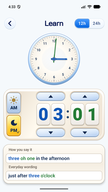
On the Learn screen play with the analogue clock, the digital clock, switch between AM and PM, and see how each one affects the other. Underneath is displayed how you would say the time out loud.
Make the connection
In Learn, an adjustable clock face sits above an adjustable digital display. Blue links the hour hand to the hours; green links the minute hand to the minutes. Written time underneath brings the two together.
Clock hands, digits and words in one view.
Read the clock yourself
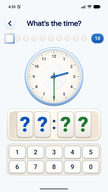
The practice activities ask “What's the time?” Read a clock face and enter the digital time, then a digital clock and put the hands in the right place on the clock face. Try the 12-hour format or work with the time of day in 24-hour practice.
Switch between clock hands and digital time.
Say it another way
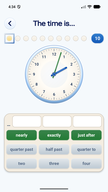
The everyday wording activity uses word choices to describe the clock. Choose expressions such as “nearly”, “exactly” or “just after”, alongside hours and phrases such as “quarter past” or “half past”.
Connect a precise time with familiar expressions.
A clock to explore
Hours in blue, minutes in green
The learning screen has separate up and down controls for hours and minutes, a 12h/24h switch and AM/PM choices with sun and moon symbols. These give children a way to explore the time while keeping the clock face in view.
Below it, “How you say it” shows the time in words and “Everyday wording” gives a more conversational expression. At 3:01 in the afternoon, for example, the English screen pairs “three oh one in the afternoon” with “just after three o'clock”.
Time for practice
Read the hands, enter the time
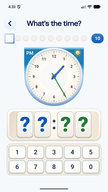
In the clock quiz, read the clock face and enter the time on a digital clock, then read the digital clock and move the hands to the right place on the clock face.
- 12-hour practice focuses on reading the clock face.
- 24-hour practice adds a time-of-day cue, such as PM and a sun symbol.
- A row of indicators at the top marks progress through the activity.
For a child who can read the hands but hesitates over afternoon hours, the 24-hour activity offers that extra step. Return to the learning screen when they need to compare the different representations again.
Everyday time
Nearly, exactly, just after
We do not always give the time to the nearest minute. This activity asks children to build a phrase from the choices on screen, using the clock as their guide.
The word choices include hours, quarters and halves, alongside expressions for being a little before or after a time. It is a different kind of practice: looking at the same hands and deciding how to describe them in everyday language.
For parents
A little practice, linked to daily life
Try a time your child knows from the day: breakfast, school or bedtime. Compare the hands, digits and words together, then choose a practice activity that suits what they need to work on.
Free to use
No payment, no subscription, just click and run
Advert free
A child's practice session is not an opportunity to show them advertising
No account
The child does not need a profile or an email
Works offline
No internet access needed
No permissions
No attempts to access the network, the microphone, the camera, or anything else
English and French
Clock activities and time expressions in both languages.