

See the pattern. Know the difference.
Odd and Even helps children see how numbers alternate, then learn to recognise which is which. Start with the number sequence, take over the answers, and try a quiz where the numbers stand on their own.
Colour and sound work together as consistent memory cues: orange for odd, blue for even, with sound reinforcing the distinction. This focused Android app gives children a way to connect what they see and hear with the choices they make.




How it works
Three simple stages
Begin by watching the pattern, then make the choices yourself. The final stage takes away the surrounding sequence so the child can try recognising each number independently.
See the pattern
Watch numbers alternate between odd and even. Orange marks odd and blue marks even, while sound reinforces the distinction. These consistent colour and sound cues are intended to help the child remember the two categories.
See it and hear it before choosing for yourself.
Try it yourself
The child chooses Odd or Even for the highlighted number, with the surrounding number sequence still in view. It is the step from watching the pattern to identifying it for themselves.
Take over the answers with the sequence still there to help.
Put it to the test
A number appears on its own. The child taps Odd or Even without the neighbouring numbers to guide them. The quiz tests whether they can recognise the category away from the simple sequence.
Recognise the number without following the sequence.
Choose an activity
Learn, repeat, practise
The menu offers three clear choices: Learn, Repeat and Practice. Learn introduces the alternating pattern. Repeat lets the child identify the highlighted number within the sequence. Practice moves on to numbers shown individually.
Choose the activity the child needs, whether that is another look at the pattern, more guided repetition or a chance to try it independently.

The quiz
Odd or even, on its own
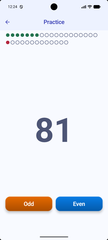
In Practice, one large number takes centre stage. The child answers using the two clearly labelled buttons: orange for Odd and blue for Even.
- Numbers appear without the surrounding sequence.
- The child chooses between Odd and Even for each number.
- The indicators at the top show progress through the quiz.
This is a chance to use the distinction they have been learning, rather than simply follow an alternating pattern.
See the result
Something to improve next time
The results screen shows a score alongside a row of stars. The child can see how they did and has something concrete to aim to improve on the next attempt.
If the distinction still needs practice, return to watching the pattern or identifying numbers in sequence before trying the quiz again.
For parents
Deliberately uncomplicated
A short session can start with watching, guided repetition or a quiz. Odd and Even keeps the focus on learning without accounts, subscriptions or advertising.
Free to use
No payment, no subscription, just click and run
Advert free
A child's practice session is not an opportunity to show them advertising
No account
The child does not need a profile or an email
Works offline
No internet access needed
No permissions
No attempts to access the network, the microphone, the camera, or anything else
Use at home or on the go
It is designed to work equally well on the mobile and tablet held in both portrait and landscape.